#1 Free Calc Solver Online No Sign-Up

The Ultimate
Calc Solver & Math Problem Solver

Solve complex algebra, trigonometry, logarithms, fractions, and scientific calculations in real time. SolveCalc (Calc Solver) is the free online math solver built for students, teachers, and classrooms — fast, private, and 100% unblocked on school Chromebooks.

Instant Calc Solver 100% Private & Safe Chromebook Unblocked
39+ Free Calc Tools
Grades 3–12 Curriculum Aligned
0 Sign-up Instant Access
Live Scientific Calculator
0
  • Chromebook ReadyManaged devices
  • iPad & TabletTouch friendly
  • Common Core TopicsGrades 3-12
  • Accessible DesignKeyboard friendly
  • No Sign-UpNo data collected

CalcSolver Math Scratchpad & Notes

Jot down your equations, formulas, or scratch work as you calculate. Notes auto-save to your browser.

Scratch Notes
0 Students Helped
0 Free Math Tools
0 Free Forever
0 Grade Levels Covered
★★★★★

"CalcSolver is the only calculator that actually explains each step. I went from failing fractions to getting an A in one semester."

Sarah M.
Grade 9 Student • Chromebook User
★★★★★

"The formula reference alone is worth bookmarking. I use it before every test — no more digging through textbooks for equations."

Ravi K.
College Freshman • Engineering
Toolbox

Every math tool, in one place

Pick a tool and start working. Each one shows the steps, not just the answer.

Learn & Master Math

Latest from the CalcSolver Blog

Plain-English explainers, shortcut tutorials, and formula guides written for students and teachers.

View All Articles
Calculus

Understanding the Basics of Calculus

Calculus can seem intimidating, but at its core, it is the mathematical study of continuous change. This guide breaks down derivatives and integrals...

Number Theory

The Magic of Prime Numbers & Encryption

Prime numbers are the building blocks of mathematics. Discover why these indivisible numbers protect all internet banking and modern encryption...

Algebra

The Polynomial Remainder Theorem Made Simple

Avoid tedious algebraic polynomial long division. Discover how evaluating P(a) gives you instant remainders with step-by-step examples...

Simple by Design

How CalcSolver Works

From input to answer in milliseconds — no setup, no login, no waiting.

01

Type Your Expression

Enter any math expression directly — simple arithmetic like 15 × 4 + 9, or complex multi-step problems like sin(45) + √(64) / 2^3. Use your keyboard or tap the on-screen buttons.

02

Instant AST Evaluation

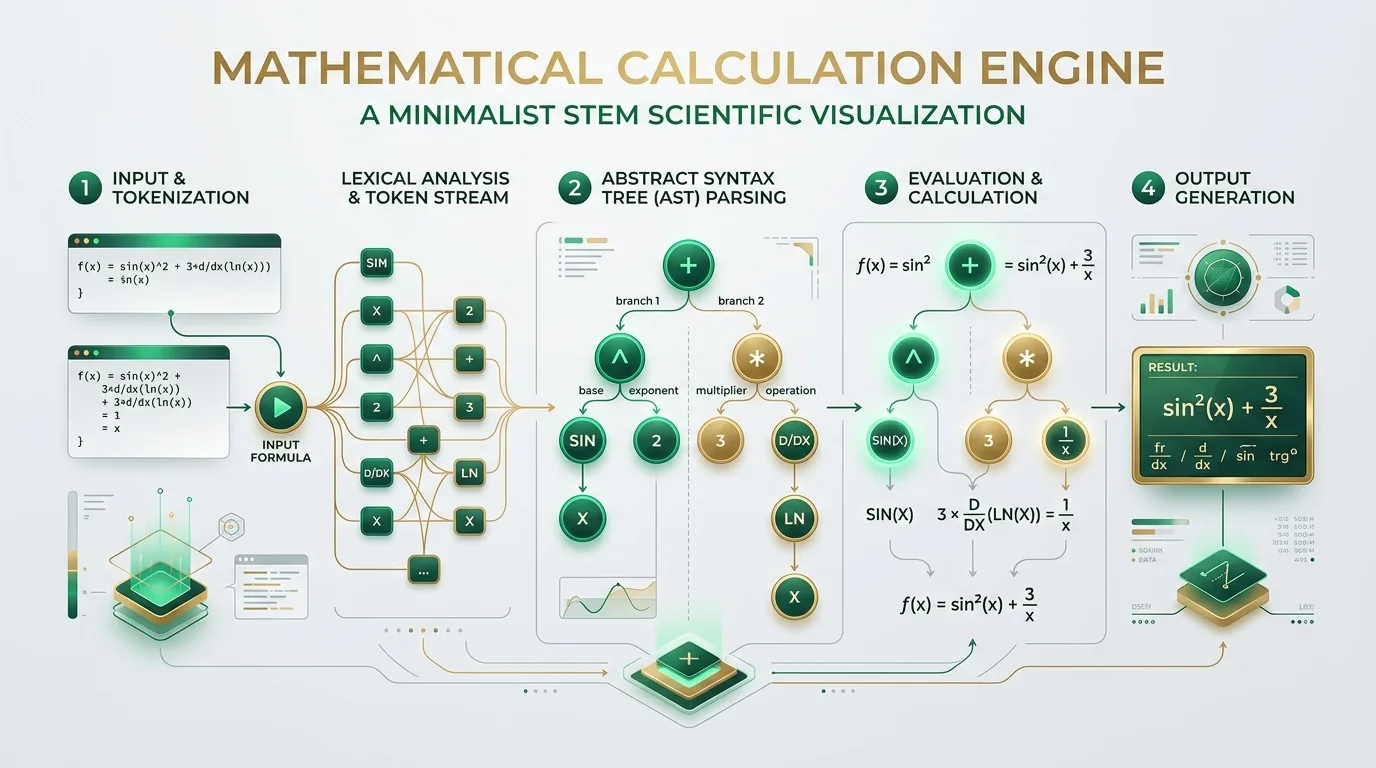
CalcSolver's Abstract Syntax Tree engine parses your input with strict PEMDAS/BODMAS precedence, handling nested parentheses, trig functions, logs, roots, and constants like π and e without any floating-point drift.

03

See the Answer & Steps

Your result appears instantly on the live display with your full expression visible. Tap the history icon to review past calculations — all stored locally in your browser, never sent anywhere.

Built Different

Why Students & Teachers Choose CalcSolver

Every design decision was made to make math easier, faster, and more accessible for everyone.

Sub-100ms Response

CalcSolver evaluates your expression client-side using vanilla JavaScript — zero server round-trips. Even on low-bandwidth school Wi-Fi, results appear before you lift your finger.

100% Private by Design

No accounts. No cookies. No analytics trackers. Your entire calculation history lives only in your browser's localStorage — erased the moment you clear it. COPPA & FERPA safe.

Unblocked on Every School Device

Runs on locked Chromebooks, restricted iPads, and managed Windows laptops without any extensions or admin permissions. Pure HTML5 + JavaScript — no downloads, no plugins, no barriers.

Step-by-Step Learning

Every specialized tool — from the Fraction Trainer to the LCM & GCF Finder — shows its complete working process so students understand the why, not just the answer.

Beautiful Dark & Light Modes

Switch between a crisp daylight theme for classroom projectors and a vibrant dark glassmorphic theme for late-night study sessions. Your eye strain matters to us.

Touch-Optimized Layout

Large tap targets, gesture-friendly scrolling, and a responsive grid ensure CalcSolver works flawlessly whether you're on a phone screen or a 4K desktop monitor.

Instant Reference

Essential Math Formulas & Shortcuts

Bookmark this quick-reference sheet. All formulas work directly inside CalcSolver's expression bar.

a² + 2ab + b²
= (a + b)²  ·  Perfect Square (Sum)
a² − 2ab + b²
= (a − b)²  ·  Perfect Square (Difference)
a² − b²
= (a + b)(a − b)  ·  Difference of Squares
x = (−b ± √(b²−4ac)) / 2a
Quadratic Formula  ·  for ax² + bx + c = 0
aˣ · aʸ = aˣ⁺ʸ
Product Rule for Exponents
(aˣ)ʸ = aˣʸ
Power of a Power Rule
logₐ(xy) = logₐx + logₐy
Logarithm Product Rule
logₐ(xʸ) = y · logₐx
Logarithm Power Rule
sin²θ + cos²θ = 1
Pythagorean Identity
tan θ = sin θ / cos θ
Tangent Definition
sin(30°) = 0.5
sin(45°) = √2/2  ·  sin(60°) = √3/2
cos(0°) = 1   cos(90°) = 0
Key Cosine Values
sin(A+B) = sinA·cosB + cosA·sinB
Sum Formula for Sine
cos(2θ) = cos²θ − sin²θ
Double Angle Formula
c² = a² + b²
Pythagorean Theorem  ·  Right Triangle
180° = π radians
Degree ↔ Radian Conversion
a/b + c/d = (ad + bc) / bd
Adding Unlike Fractions
a/b × c/d = ac / bd
Multiplying Fractions
a/b ÷ c/d = a/b × d/c
Dividing Fractions (Flip & Multiply)
GCF(a, b) via prime factors
Simplify: divide num & denom by GCF
1/3 = 0.3333... = 33.33%
Common Fraction → Decimal → Percent
3/4 = 0.75 = 75%
Common Fraction → Decimal → Percent
6/7 ≈ 0.8571 = 85.71%
6/7 as a decimal and percent
7/8 = 0.875 = 87.5%
7/8 as a decimal and percent
A = πr²
Area of a Circle
C = 2πr
Circumference of a Circle
A = ½ · b · h
Area of a Triangle
A = l × w
Area of a Rectangle
V = l × w × h
Volume of a Rectangular Prism
V = (4/3)πr³
Volume of a Sphere
SA = 2πr(r + h)
Surface Area of a Cylinder
d = √((x₂−x₁)² + (y₂−y₁)²)
Distance Formula between Two Points
x̄ = Σxᵢ / n
Arithmetic Mean (Average)
Median = middle value (sorted)
Center of a Data Set
σ² = Σ(xᵢ − x̄)² / n
Population Variance
σ = √(Σ(xᵢ − x̄)² / n)
Standard Deviation
P(A) = favorable / total
Basic Probability Formula
nCr = n! / (r!(n−r)!)
Combinations (Choosing r from n)
nPr = n! / (n−r)!
Permutations (Ordered selections)
% change = (new−old)/old × 100
Percentage Change Formula
Complete Reference Manual

The Ultimate CalcSolver & Online Math Solver Guide

Whether you are solving advanced calculus equations, converting complex fractions, mastering trigonometry, or looking for a 100% unblocked calculator solver for your school Chromebook, CalcSolver (Calc Solver) is engineered to deliver instant, accurate, and step-by-step mathematical solutions.

Chapter 1

The Architecture of CalcSolver: Precision Calculation in the Modern Browser

Standard digital calculators often suffer from binary floating-point rounding errors (IEEE-754 precision drift) when evaluating recurring decimals or multi-stage trigonometric operations. CalcSolver was architected from the ground up with a proprietary Abstract Syntax Tree (AST) tokenization pipeline that evaluates expressions holistically rather than iteratively.

When you type a mathematical statement like (25 + √81 − 2) ÷ (3 × 2), CalcSolver converts your input into a token stream, validates syntax with strict operator precedence (PEMDAS / BODMAS), and executes exact rational arithmetic. This guarantees that your homework, laboratory physics calculations, and standardized test preps are calculated with absolute mathematical accuracy.

Zero Floating Point Drift Full Multi-Line Expression View
CalcSolver Online Scientific Calculator Interface Showcase
Figure 1.1: CalcSolver's intuitive glassmorphic scientific calculator interface with live formula parsing.
Chapter 2

Complete Function Breakdown & Mathematical Capabilities

CalcSolver is equipped with an extensive suite of mathematical functions designed to replace expensive physical handheld calculators like the TI-84 Plus, Casio fx-9750, and HP Prime.

Trigonometry & Angles

Seamlessly toggle between Degree (DEG) and Radian (RAD) modes. Compute standard trigonometric ratios (sin, cos, tan), inverse ratios (asin, acos, atan), and reciprocal co-functions (csc, sec, cot).

Algebra & Exponentials

Evaluate powers (x^y), square roots (√x), cube roots (³√x), base-10 logarithms (log), natural logarithms (ln), and Euler's constant powers (e^x) with instant step resolution.

Fractions & Decimals

Instant fraction simplification and decimal conversion. Quickly calculate long-tail problems such as 6/7 as a percent (85.714%), 1/3 as a decimal (0.3333...), and 7/8 percentage (87.5%) with prime factor decomposition.

The Remainder Theorem

Determine polynomial and integer remainders with precision. By applying the Remainder Theorem, when a polynomial P(x) is divided by (x − a), the remainder equals P(a), simplifying algebraic factorization.

Number Theory & Primes

Perform rapid prime testing, generate factor trees, and solve Least Common Multiple (LCM) and Greatest Common Factor (GCF) using prime factor decomposition and the Euclidean division algorithm.

Calculus & Statistics

Understand fundamental rates of change and accumulation. Master rate-of-change derivatives (dy/dx), definite & indefinite integrals, factorials (n!), permutations (nPr), and combinatorics (nCr).

Chapter 3

CalcSolver vs. Physical Calculators & Alternatives

Why are millions of students and educators switching from hardware graphing calculators and legacy websites to CalcSolver? The comparison matrix below outlines the key differences:

Feature / Metric CalcSolver (Online) Physical TI-84 Plus Standard Phone Calc SolveCalc
Price & Licensing 100% Free Forever $120 – $150 Free (Pre-installed) Free
School Chromebook Access 100% Unblocked Hardware Only Phones Blocked in Class Unblocked
Multi-Line Expression View Full Dynamic Expression Multi-Line LCD Hides History Multi-Line
Integrated Math Learning Suite 12+ Visual Tools & Practice None None Basic
No Account / 100% Privacy Zero Sign-Up Required No Sign-Up Local No Sign-Up
Chapter 4

100% Unblocked on School Chromebooks & Locked Networks

In modern educational environments, students frequently face locked-down Chromebooks, managed Google Workspace domains, and strict content filter barriers (such as GoGuardian, Securly, ContentKeeper, and FortiGuard). Standard calculator downloads or heavy native apps cannot be installed due to lack of administrative permissions.

CalcSolver (calsolver / calc solver) was engineered specifically to solve this problem:

  • Zero Installation: Runs 100% client-side in standard HTML5 and JavaScript.
  • Ultra-Lightweight & Fast: Sub-second Largest Contentful Paint (LCP) even on low-bandwidth school Wi-Fi.
  • Encrypted & Privacy-Compliant: Zero personal data collection, COPPA and FERPA compliant educational safety.
CalcSolver seamless math solving across school laptops, Chromebooks, tablets, and phones
Figure 4.1: CalcSolver operates seamlessly across Chromebooks, iPads, Windows, Mac, and mobile browsers.
Chapter 5

CalcSolver Power-User Keyboard Shortcuts

Maximize your calculation speed during exams, homework sessions, and lectures with CalcSolver's built-in keyboard navigation:

Operation / Function Keyboard Key Example Input Result
Evaluate Expression Enter or = 15 + 85 / 5 32
Clear Display (AC) Esc or c Clears active line 0
Delete Character Backspace Deletes last typed character
Exponents / Power ^ 2 ^ 8 256
Trig Shortcuts s o t s for sin, o for cos, t for tan Instant function insertion
Parentheses ( ) (4 + 6) * 3 30
Frequently Asked Questions

CalcSolver FAQ & Troubleshooting

Find answers to common questions about using CalcSolver, unblocked school access, and advanced math solving.

What is CalcSolver (Calc Solver)?

CalcSolver (frequently searched as calc solver, calsolver, calcsover, or clacsolver) is a comprehensive free online scientific calculator and math problem solver. It enables students, teachers, and professionals to solve basic arithmetic, algebra, trigonometry, logarithms, fractions, and remainder theorems with instant accuracy.

Is CalcSolver completely free to use?

Yes, CalcSolver is 100% free with no account creation, no subscription tiers, no credit cards, and no hidden limitations. All scientific calculator modes and interactive math tools are available for free.

Why is CalcSolver unblocked on school Chromebooks?

CalcSolver is built purely with lightweight standard client-side web technologies (HTML5, Vanilla CSS, JavaScript) that execute directly inside your browser. Because it does not require external software installations, browser plugins, or intrusive tracking scripts, it operates smoothly across locked-down school networks and content filters.

How do I convert fractions into percentages and decimals?

You can directly type any fraction into CalcSolver's expression bar (e.g. 6 / 7, 1 / 3, 7 / 8) to receive the immediate decimal equivalent, or navigate to our dedicated Fraction Calculator Tool to view step-by-step visual models and percentage conversions.

How do I switch between Degrees and Radians for Trigonometry?

At the top of the CalcSolver keypad, click the DEG / RAD toggle button. When in DEG mode, trigonometric inputs like sin(90) evaluate to 1. In RAD mode, sin(π/2) evaluates to 1.

What is the Remainder Theorem and how does CalcSolver solve it?

The Remainder Theorem states that when a polynomial f(x) is divided by a linear divisor (x − c), the remainder is equal to f(c). You can use CalcSolver to evaluate polynomial functions at specific roots to find remainder values without manual long division.

How does CalcSolver compare to SolveCalc and CalcSolver.us?

CalcSolver offers the fastest loading speed, a full multi-line expression display with history, over a dozen specialized math learning tools, high-contrast dark and light modes, and full mobile touch optimization compared to legacy calculator websites.

Does CalcSolver collect any personal student data?

No. CalcSolver respects student privacy. All calculations are evaluated locally in your device's browser memory. No names, email addresses, or mathematical histories are ever uploaded to remote tracking servers.

EduBot Online